Telephones
| Cellular 2G_3G_4G/LTE_5G_6G | Roaming | Sell | Spam | VoIP | Wireless Home Phone |
| Apple | Bell | BlackBerry | Rogers | Telus | Videotron | VoIP |
- Echo = line echo = hybrid or electric echo phone echoing = a problem in all phones - A latency of greater than 35ms becomes noticeable and/or annoying. All phone systems (since 1950) provide echo suppression or echo cancellation.
- Causes
- VoIP (Voice over Internet Protocol) latency or other network or hardware issues
- Speakerphone - sidetone = loop-back = feedback loop
- Solutions
- Turn off speakerphone
- Hang up and call back
- Mobile Phone Museum
- Cases / Protection
- Charging
- Why you should really stop charging your phone overnight | ZDNet
- Charging Your Phone Overnight: Battery Myths Debunked | News & Opinion | PCMag.com
- Charging Your Phone Overnight: Battery Myths Debunked | PCMag
- Keep the phone battery charge between 30 and 80 percent to increase its lifespan.
- Current iPhones come with a 5-watt (that's 5 volts at 1.1 amps) charger block which works, but of course, you can charge faster with a 10W charger, which has an output of 5 volts at 2.1amps.
- Lithium-ion batteries perform effectively for around two to three years, and that's when the manufacturers would really like you to upgrade to a new phone.
- If you plan to swap phones every year or two, charge the stupid thing any way you want, as often as you want, and don't worry about the diminished capacity. However, if you want to stretch things out, use best practices for Lithium-Ion batteries as described in the article, above. It may help. Or, just take it in to and get a new battery installed every couple of years.
- Messaging - Text messages
- WhatsApp won't do anything until the user gives FaceBook access to the entire contacts list, which then gets uploaded.
- Apple Messages
- Signal
- Telegram Messenger
- Offline Messaging
- Storage Space - Data
- Hacked
- Health
- Top 10 business smartphones of 2015 | IT Business Slideshow
- Menus & Voice Menus & Recordings & Interminable Wait Times | Help | Support
- Do Not Call List
- Apple
- Carriers in Canada
- Blackberry by Research in Motion
- goTenna | Extend the edge of connectivity.
- Headphones ...
- Roaming / Traveling
- Sell it
- See also: Recycle.htm ...
- See also: Disposal
- Amazon Trade-In: Get Paid for Your Used Items
- Apple
- Best Buy
- eBay: Cell Phones & Accessories
- Decluttr | Sell My Stuff | Sell Stuff Online
- EBGames.ca - GameStop store
- Gazelle | Recycle Cell Phones and Electronics for Cash | Gazelle
- Gizmogul.com | Sell My Cell Phone - Get Cash for Old, Used or Broken Cell Phones at Gizmogul.com
- Glyde | Simply buy and sell your games, iPads, iPhones and more
- NextWorth
- Rogers - Find Your Device
- Swappa - Buy & Sell - Phones, Laptops, Sneakers, & More
- uSell
- ---
- How to Sell Your Phone for as Much as Possible - How-To-Geek
- How to Trade In or Sell Your iPhone | WIRED
- How to Sell Your iPhone Safely | PCMag.com
- Best Buy Online Trade In for Computers, Cell Phones and More
- TechJunkie - iPhone Android Windows Tutorials and Tips
- How to Responsibly Dispose of Your Electronics | WIRED
- You can generally command the highest fees by selling directly to people through eBay, Craigslist, Facebook Marketplace, or Nextdoor. Just remember that you will need to arrange delivery or meet up to exchange the goods, and buyers often like to haggle.
- For a hassle-free sale, consider places like Swappa, DeCluttr, or GadgetPickup.
- How to Sell Your iPhone Safely | PCMag
- VoIP
- Protect Your Data. Protect Yourself - Check the Status of Your Device in Canada
- Local calling guide
-
- Spam & Robocalls
- Your cellular package should include services for named caller ID for callers not in your address book. Named caller ID for people not in your phone book has been a value-added service for all of the wireless carriers for years. T-Mobile calls it Name ID; Verizon calls it Call Filter Plus.
- How to Stop Robocalls - Block Spam Calls to Cell Phone
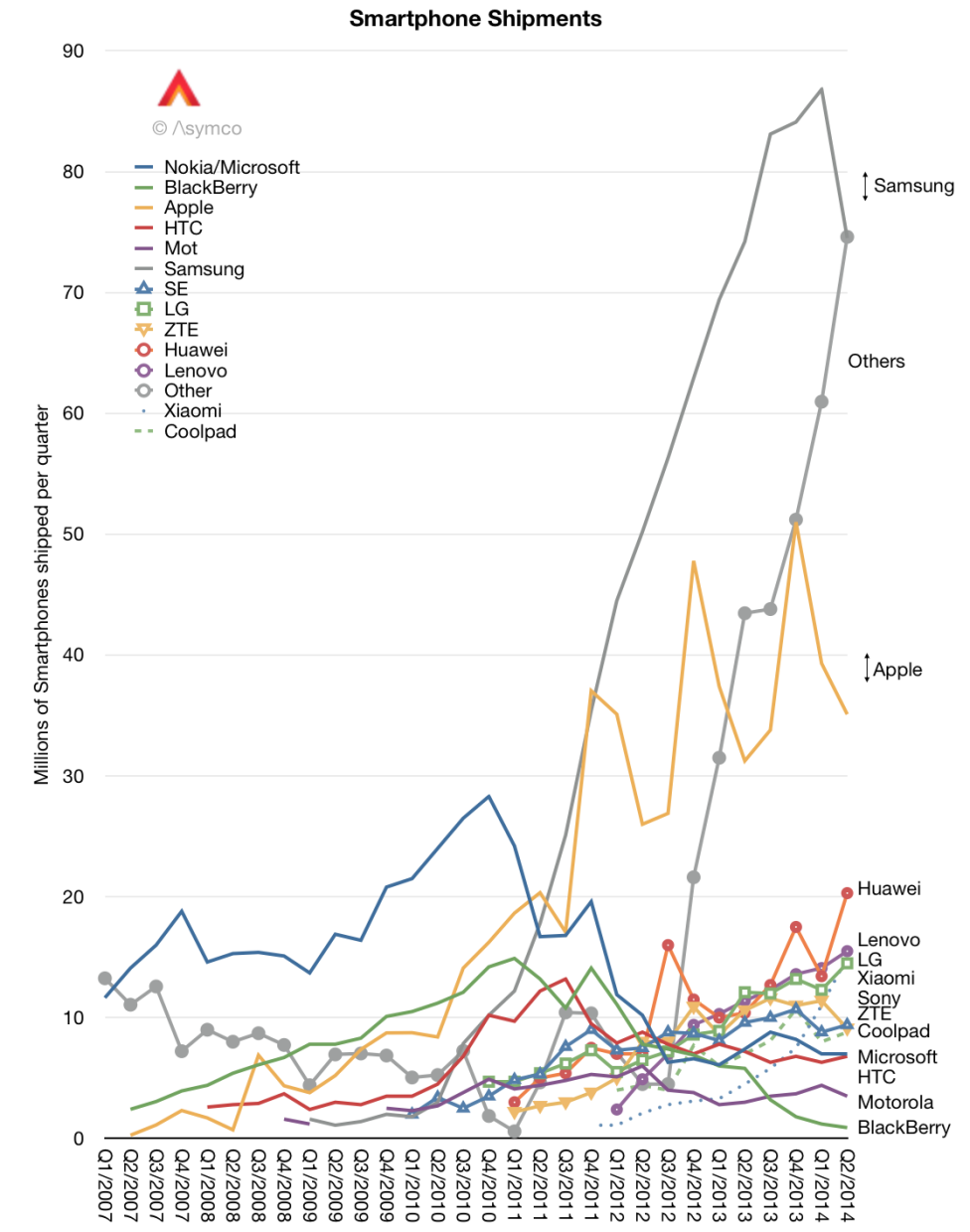
- Smartphone Shipments 2007-2014
- Best 10 smartphones at the close of 2014 | ZDNet - 2014-12-10
- The Best Phones for 2020 | PCMag
- Handheld Group - Rugged computers for tough environments
- Cell Phone Plans | myCELLmyTERMS.com | Create a Plan Today & Save! - $0
- Bud Phone
- DNCL
- Gloves
- GSMArena.com - GSM phone reviews, news, opinions, votes, manuals and more...
- Iristel Your Global Phone Company ~ Your voice at light speed - Your VoIP service provider - Iristel Inc. offers users one single phone number for all their devices and the ability to seamlessly “hop” calls between them
- PhoneBusters - national anti-fraud call centre jointly operated by the Ontario Provincial Police and the Royal Canadian Mounted Police
- VOIP
- IVR (interactive voice response) systems - Wouldn't you prefer to talk to a human?
- gethuman.com - When you're sick of pressing 10 or more options in order to reach a real person and spending many minutes or even hours on hold, consult the GetHuman database of secret phone numbers and codes that get an actual, live person on the line for customer service at nearly 1000 major companies.
- Cellular
-|- G/2G/3G/4G/5G/6G = (G 2G 3G 4G 5G 6G )
- Wavelengths ...
- What is 6G and When Will it Come Out?
- What is 5G? - Morning Brew
- What Is 5G Technology - Intel
- Benefits of 5G Technology and Advantages of 5g Networks | Intel
- 5G mobile telephony: a primer - Common Ground
- Prices / Cost / Plans
- 2018 typical data speeds
- Telus home | Down 75-100 Mbps (sometimes goes over 110 Mbps), Up 15 Mbps
- Telus Cellular Wi-Fi | Down 70 Mbps, Up 4.5 Mbps
- Rogers Cellular 4G | Down ~25 Mbps, Up ~20 Mbps
- Top 5 terms to know about 5G - TechRepublic
- What is 5G? Everything you need to know | TechRadar
- Minimum expected | Down 1Gbps = 1000 Mbps
- Expected | Down 1-10 Gbps = 1000-10000 Mbps
- Possible? | Down 800 Gpbs
- What Is 5G? | PCMag
- The G in 5G means it's a generation of wireless technology. - cellular telephone networks
- The official 5G standard, known as 5G NR (new radio), probably won't come out until 2018, with full commercial rollouts in 2019 or 2020.
- 5G may give cellular carriers enough capacity to offer truly unlimited home service plans, as the data caps on current wireless plans just don't work for home use.
- The goal is to have far higher speeds available, and far higher capacity per sector, at far lower latency than 4G. The standards bodies involved are aiming at 20Gbps speeds and 1ms latency.
- Huawei, 5G, and the Man Who Conquered Noise | WIRED - Claude Shannon, Erdal Arıkan, Huawei
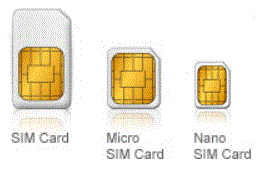
- SIM = eSIM = (subscriber identity module) card
- Unlocking
- $35 by your carrier. The manufacturer (Apple, etc.) can't unlock your phone.
- If Apple replaced your phone when repairing it, the phone is probably unlocked.
- Use iTunes to see if your iPhone is unlocked.
- Use a SIM from someone else's phone. If it works, your phone is unlocked.
- ATT 800-CALL-ATT
- BlackBerry ...
- Burner accounts
- Cell phones, cellular plans, and mobile accessories in Canada
- NET10 Wireless - Pay As You Go Made Simple
- Net10 Wireless
- RadioShack.com - Buy the phone from Radio Shack - USA only
- Rogers
- Verizon Wireless
- Virgin Mobile
- Buy a phone (e.g. from Radio Shack)
- You must top-up the card with $20 every 3 months
- $0.25/min for the first 10 minutes, then $0.10/minute anytime anywhere in North America
-
- Ten terrific things you can do with text messaging
- The New Pocket PCs | PCMag
Wireless Home Phone
Apple
- In an interview with the Reader’s Digest in 1998, Jobs said the ‘i’ stands for “internet, individual, instruct, inform and inspire”.
However, in the same interview, he also added that none of these words has priority over the other meanings.
So when people speculate it may simply mean ‘i’ as in ‘myself’, they’re not entirely wrong.
And here’s another meaning that Steve Jobs never mentioned: ‘identity’.
The letter ‘i’ has become a pillar of Apple’s brand identity.
- See also: Apps
- See also: iOS
- See also: iPhone
- See also: iTunes
- See also: iWatch
- See also: Photo
- See also: Security
- AppleCare or AppleCare One = Warranty = Insurance
- Apple - Personal Safety User Guide for Apple devices (PDF - 7.2 MB, 131 pages)
- News about Apple
- AirTag
- The Best Hidden AirTags Features | Lifehacker
- Are You Being Tracked by an AirTag? Here’s How to Check | WIRED
- noiseless airtags - YouTube - How to disable/silence/mute the AirTag
- The best way to disable an AirTag is to remove the battery.
- Why Everyone is BREAKING OPEN APPLE AIRTAGS - YouTube - Disable the speaker in the AirTag
- How to Rename AirTags
- Sharing an AirTag
- Before iOS 17
- AirTag can be used with two different iPhones only if they have the same Apple ID logged in. (before iOS 17)
- How To Transfer An AirTag To Another iPhone User
& (Can AirTags Be Added To A Second iPhone?) - 2023-05-26 (before iOS 17)
- An AirTag can only be linked to one Apple ID at a time, which means that family members can't view its location in the Find My app. Unfortunately, this makes sharing ownership of an AirTag impossible.
- Can you track AirTags using family member's iPhone? - 2022-06-07 (before iOS 17)
- If you thought about sharing your AirTag with a member of your Family Sharing circle so he/she could find a location of a shared item like a set of keys that has been lost or, worse, stolen, think again, as this won’t work. You cannot track the location of a family member’s AirTag.
- However, you can track the location of family members’ iPhones, iPads, Macs, and other Apple devices.
- iOS 17 and newer
- How to share an AirTag with other people on iOS
- 2024-04-23
- Find My > Items > select the AirTag > Add Person > Continue > Send
- How to Add an AirTag to a Second Phone - 2024-02-28
- If you have two devices you want to keep under different Apple IDs (such as a work phone and personal phone), or if you want to share an AirTag with someone else, you'll need to share the AirTag's location from Find My. The iOS 17 update made it possible to share AirTags with up to five other Apple users, even those that aren't part of your Family Sharing Group. This means that you can share an AirTag that tracks your remote or the spare key to the house with other users and devices who don't share your Apple ID. You can share AirTags from FindMy; just select the AirTag you want to share and tap "Add Person" under the Share This Airtag section.
- iPhone Transfer Software · Macroplant
- iPhone Music, Messages & File Transfer for Mac & PC · iExplorer - US$40
- It transfers music, messages, photos, files and everything else from any iPhone, iPod, iPad or iTunes backup to any Mac or PC computer. It's lightweight, quick to install, free to try, and up to 70x faster and more resource efficient than the competition.
- iPhone Tricks That Will Make Things So Much Easier
- iPhone For Dummies Cheat Sheet
- iPhone For Seniors For Dummies Cheat Sheet
- Today at Apple - Apple (CA)
- iPhone & iPod Tutorials & Resources - Lifewire
- Hearing Aids ...
- How To Connect Your iPhone or iPad to Your TV
- iTunes
- Apps
- Open-Source iPhone Apps You Should Be Using
- Podverse, Dime (personal finance), VLC (see also: Graphics), LocalSend, NetNewsWire (RSS reader), OpenScanner, Joplin (note-taking, iOS only), Ente Auth (2FA), OnlyOffice Documents (alternative to MS Office), Signal (messaging, any OS)
- Craft the best docs in the world
- Craft is a wonderfully feature-rich product whose new features - in domains from task management to fancy formatting - make it a viable alternative to Notion. But Craft’s overall polish and the balletic grace with which it incorporates elements such as drag-and-drop go far beyond Notion’s merely workmanlike experience. The Verge’s David Pierce has a full review; one of his favorite new features—a quick-add button that lets you instantly start typing away and even leave text pinned to the bottom of the screen until you decide what to do with it - isn’t yet available on the iPad. But Craft’s developer tells me it’s on the way. (The app is also available for iOS, MacOS, and Windows.) -|- FastCompany 2024-12-04
- The Best iPhone Apps | PCMag
- The Best iOS-Only Apps | PCMag
- Callsheet: Find Cast & Crew on the App Store - Better than IMDB - Movie/TV cast & crew search - Apple's "Editors' Choice" - CA$10/yr
- Download the Microsoft 365 Mobile App | Microsoft 365
- iOS to Windows: How to Copy and Paste Text Between Your iPhone and PC | PCMag
- Maritime Apps for Your Next Seaside Vacation - The New York Times - $subscription
- Heart
- QuickTime
- ----------------------
- Recording Voice calls
- How to Record a Phone Call on Your iPhone
- How to Record and Transcribe Audio in Notes on Your iPhone
- Apple: Want to record a phone call on your iPhone? Here’s how
- Tricks to Get Higher Quality Audio Recordings On iPhone
- iPhone's Voice Memos app, Dolby On, Otter
- All Apple Watches come with the Voice Memos app and a built-in microphone. It automatically transfers the recording to your Apple Cloud Storage.
- Since iOS disables the ability for apps to record audio while a call is active, you must use a third-party app to record calls on your iPhone. iOS has a lot of restrictions. In this particular case, third-party apps cannot gain access to the Phone app and the microphone at the same time, which makes recording phone calls a much trickier task.
- Three-way voice call = Merge calls = Conference call = "Add Call" during a phone call
- How to Record a Phone Call on Your iPhone or Android Phone | WIRED
- Google Voice can't record outgoing calls.
- Apple makes it difficult to use third-party call recorders.
- Consider using another device to record calls. You will probably have to crank the call volume up or put it on speaker for this to be effective.
- TapeACall
- TapeACall: Call Recorder on the App Store - US$90/yr
- The Lite version is pretty much useless (only lets you listen to the first 60 seconds of a recorded call), so the Pro version is worth grabbing.
- It gets around Apple’s restrictions on audio recording by creating a three-way voice call between your contact, yourself, and its servers, which record the call and send it to you afterwards as a download.
- Three-way voice call = Merge calls = Conference call
- Easy Voice Recorder - Google
- Voice Memos - on the App Store - $0
- How to record phone calls on an iPhone | Tom's Guide
- The 8 Best Apps to Record Phone Calls on iPhone
- LifeWire
- How to Record a Phone Call on an iPhone
- How to Record Calls on an iPhone | PCMag.com
- Top Voice Recorder Apps That Won't Miss a Second | PCMag
- How to Create Voice Memos on iPhone, iPad, or Apple Watch | PCMag
- Don't Miss a Second: The Best Voice Recorder Apps | PCMag
- Music
- Photos / Photography / Camera
- Photography ...
- Dropbox ...
- Security Camera ...
- This one iPhone camera setting made my photos so much better
- Adobe launches a new ‘computational photography’ camera app for iPhones | The Verge
- Project Indigo on the App Store
- Adobe recommends using an iPhone 15 Pro or newer
- Instead of capturing a single photo, Indigo captures a burst of photos and combines them together to produce a high-quality photo with lower noise and higher dynamic range.
- Recovery = Recover deleted data files ...
- The 9 Best iPhone Photo Editing Apps
- iPhone Photos, Pixelmator, Snapseed, Adobe Lightroom, Darkroom, Unfold, Tezza, Afterlight, VSCO, ...
- How to Cut a Clip Out of a Video on an iPhone or iPad
- Best iPhone camera settings, according to an expert | Mashable
- iPhone Diary: As expected, the camera improvements sold me an iPhone 15 Pro Max
- The Apple iPhone 15 Pro is teaching me to embrace digital zoom - The Verge
- Smartphone camera zoom has improved a lot over the past few years, but you’ll still get much better quality from a big, traditional camera with a big sensor and a big lens. Computational photography hasn’t overcome physics.
- 11 hidden iPhone camera tips everyone needs to know | Tom's Guide
- iOS Hacker - Apps Archives
- How to Get Photos Off Your iPhone (or Any Smartphone) | PCMag
- How to Take Back Control of Your Photo and Video Storage | WIRED UK
- Option: Move all photos to your local devices (PC, NAS, etc.). Remove photos from cloud storage. Set up regular local backups.
- Get Organized: How to Back Up and Organize Photos From Your iPhone or iPad
- Organize Your Apple Photos: How to Create, Edit, and Share iPhone Albums | PCMag
- How To Access Your iPhone Photos in the Windows 11 Photos App
- HEIC vs JPG ...
- Why Zoomed Photos Look Bad on Your iPhone (and How to Fix Them)
- iPhone Photography #101: Uncover the Hidden Menu
- How to transfer every picture from your iPhone to an external drive
- iCloud+ email ...
- Rotated picture if you use the side button (volume up) to take a picture.
- How To Do A Reverse Image Search From Your Phone
- bokeh iphone x - Google Search
- Your iPhone 14 Pro doesn't take 48MP photos out of the box - here's how to change that | Tom's Guide
- Security
- cellphone / iPhone / etc.
- iOS 18 new feature called “inactivity reboot,” which appears to force iPhones to reboot on the fourth day after being locked.
- Police
- Police (including the USA CBP - Customs and Border Police) use tools like Cellebrite to essentially hack into phones, but this is typically done when a device is in the so-called After First Unlock (AFU) state. Once they reboot, iPhones are put into Before First Unlock (BFU), which makes them much harder to access with forensic tools.
- AI = Apple Intelligence = A.I. = Artificial Intelligence
- How to Turn Off Apple Intelligence on an iPhone, iPad, or Mac | WIRED
- 10 iPhone Settings I Always Keep Disabled
- Settings > Privacy & Security > Location Services > System Services > Significant Locations
- Settings > Privacy & Security > Tracking
- Settings > General > AirDrop > Bringing Devices Together
- Settings > Apps and select an app. Now head to the "Apple Intelligence & Siri" section and hit the toggle beside "Learn From This App" to disable it.
- Settings > Apps > select an app > Apple Intelligence & Siri > Learn From This App
- Unfortunately, in iOS, there's no universal switch to stop Siri from learning from apps en masse, so you'll need to go through this process for every app you wish to exclude from Siri personalization.
- -- Less important --
- Settings > Notifications > Screen Sharing > Allow Notifications
- Settings > StandBy >StandBy
- Settings > Camera > Record Sound > Allow Audio Playback
- Settings > Face ID & Passcode > Attention Aware Features
- Settings > Apps > App Store > Automatic Downloads > App Updates
- Settings > Apps > App Store > Offload Unused Apps
- Apple’s new photo feature in iOS 18 is sending data to its servers — how to turn it off | Tom's Guide - EVS is enabled by default
- How to optimize iOS privacy settings - Geeky Gadgets
- Settings > General > Background App Refresh > ... - Disabling this feature is a proactive step that can significantly bolster your privacy by limiting the flow of your personal information that can be monitored.
- Settings > Privacy & Security > App Privacy Report > On
- Settings > Privacy & Security > Location Services > ... While Using - Ensure that your location preferences are configured precisely to your comfort level.
- Safari (and all other browsers) should always use ad blockers.
- 7 iPhone privacy settings you should enable now
- Stolen iPhone
- How to Use Stolen Device Protection on Apple’s iPhone | WIRED = SDP
- The main thing the feature triggers is it starts requiring your Face ID biometrics to access any sensitive features on the phone, like using your Keychain passwords, seeing your stored payment information in Safari, and disabling Lost Mode. Even if the thieves know your passcode, it will no longer work as a backup option; Face ID becomes required for full access. This also prevents thieves from easily wiping all your data off the phone so they can sell it, as that procedure requires FaceID as well.
- Settings, then Privacy & Security, and Location Services. After that, scroll all the way down until you see the System Services tab. Select Significant Locations, and you’ll likely be prompted to unlock it with Face ID. On the next page, move the toggle to the right to finish enabling the feature.
- Open Settings one more time, then Face ID & Passcode, and fill out your passcode. Scroll about halfway down on the page, choose the Stolen Device Protection tab, and move that toggle to the right.
- If your iPhone or iPad is lost or stolen - Apple Support
- Things the guys who stole my phone have texted me to try to get me to unlock it - Gothamist
- As long as you don't remove the phone from your Apple account or the Find My app, the phone is essentially bricked to anyone without the passcode and your iCloud password — unusable by the thieves, or the fences who I assume bought it from them.
- Warning! Do not follow the instructions from any bogus message from the scammer.
- Example scam message: "Apple Support - To ensure the safety of your accounts, please use "Find My" APP to remove your Apple id and cancel your payment method as soon as possible. This will unbind your apple id from another devvice."
- If the phone is still linked the iCloud account, anyone having the phone still has access to all of the original owners’ texts, emails and photos.
- Lockdown Mode
- App Privacy Report
- Captcha
- iOS
- Safari - iPhone's browser is really just a customized version of Safari, with all the support for web standards, Ajax, and other niceties that come with it.
- Hidden Tricks Inside Apple's Safari Browser | PCMag
- iPhone sports a desktop-grade web browser based on Safari, which supports hooks into the iPhone's built-in applications (phone, address book, calendar, etc.).
- Safari on the iPhone does not support Flash, or other plug-in technologies like Java applets.
- Safari on the iPhone has no text selection or clipboard features.
- Safari on the iPhone provides no support for multi-touch events within web applications.
- In fact, Safari on the iPhone provides no way to respond to the user touching the screen at all—all you get is a
click event in response to single taps.
- How to Use the Secret Safari Browser Hidden on Your Apple Watch
- Even though there is no visible browser on Apple Watch, if you receive a link in Messages or Mail, you can tap to open it and use a watchOS version of Safari to browse the web.
- Safari Desktop Mode
- iCloud ...
- iPhone
- See also: iPhone Privacy ...
- Camera - see Photo
- Camera - iPhone
- Open Scanner - $0
- Security > Privacy ...
- Nobody Told Me About These iPhone Gestures, Now I Use Them Every Day
- 102 Expert iPhone Tricks You Should Know | PCMag
- Clicks Keyboard for iPhone 16
- Mapping the iPhone
- Phone Link
- 2 Ways to Link iPhone to Windows 10/11 PC - TechWiser
- Microsoft's Phone Link App: What Is It and How Do You Use It?
- To connect your iPhone, your PC needs to have Bluetooth with Low Energy.
- With the Phone Link app, you will be able to check your iPhone notifications, make calls, and most importantly, you can send iMessage from your PC.
- Phone Link - Microsoft Apps
- Intel Unison - Free download and install on Windows | Microsoft Store
- The Intel Unison app provides more functionality such as the ability to transfer files, access photos, and videos, check notifications, make calls, and send normal messages.
- Intel® Unison™ on the App Store
- Calling & Answering
- 3 Ways to Remove Background Noise During Calls on iPhone - Gadgets To Use
- Make a cellular phone call on your iPhone. > Swipe down from the top right to open Control Center > Voice Isolation
- Noise Cancellation is available and on by default on iPhone 12 and earlier. Newer iPhones do not support this feature. Why????
However Noise Cancellation is available only for Apple products (AirPods, Headphones).
- Settings in an app (FaceTime, WhatsApp, Instagram, etc.)
- Hearing Aid
- Settings > Accessibility > Hearing Devices > Hearing Aid Commpatibility > Off
- 102 Expert iPhone Tricks You Should Know | PCMag
- iPhone / iPad
- Forced Restart
- Hold down the LOCK button (top right) and the HOME button at the same time.
- Continue to hold both buttons until you see the Apple logo.
- Release the buttons as soon as the logo appears.
- Guided Tutorial Solutions tool | Vidéotron - Device Simulators
- Apple Watch
- Disposal
- See also: Sell it
- Steps to follow
- Back Up - iCloud, another cloud, USB Flash drive, External drive
- Settings > Your Name > iCloud > Find My iPhone and slide it to off
- Get latest version of iTunes
iTunes, go to File > Devices > Back Up. Make sure the backup took by going to Preferences > Devices and checking the date and time of the last backup.
- Settings > Messages > and toggle iMessage to off
- Go to the My Watch tab and select your watch at the top of the screen. Select the info circle ( ) next to the watch you want to unpair. Tap Unpair Apple Watch and tap to confirm, which may require you to enter your Apple ID password.
- Sign out of iCloud, as well as iTunes and the App Store, before selling the device.
On iOS 10.3+, tap Settings > [your name] > Sign Out. Enter your Apple ID password and tap Turn Off.
- On iOS 10.2 or earlier, tap Settings > iCloud > Sign Out. Tap Sign Out again, then tap Delete from My [device] and enter your Apple ID password. Then go to Settings > iTunes & App Store > Apple ID > Sign Out.
- Settings > General > Reset > Erase all Content and Settings
- Remove the SIM card.
- Factory reset
- Programming Languages - JavaScript, Java, Flash
- iPhone does support JavaScript, but neither Flash nor Java is supported, so users will not be able to view sites that rely on those elements.
- Apple CEO Steve Jobs: "Java’s not worth building in [to the phone]. Nobody uses Java anymore. It’s this big, heavyweight ball and chain."
- Comments
Bell Canada
Rogers
- 2017 - Rogers no longer supports BlackBerry OS. The Rogers MyAccount app is not being updated for BlackBerry.
- Rogers suggests throwing out the BB-OS.10 phone (i.e. planned obsolescence) and buying another newer phone (Android) from Rogers.
- TechXpert - 855-877-3887
- BlackBerry ...
- Data usage - 1-877-764-3772
or check your "Rogers My Account"
- This is a complete waste of time.
- Rogers refuses to provide your data usage until you get your statement at the end of the month.
- Yes. Rogers does know about this. Rogers refuses to fix this problem. (Since 2011 and probably before 2011.)
- Help = Technical Support
- 611 - Help
- 855-877-3887
- 866-931-3282 Rogers BlackBerry Smartphone Tech Support
- 416-935-4467 Rogers BlackBerry Technical Support
- Online Customer Care at 1-877-343-5745
- 888-764-3771
- 1-888-Rogers1 = 1-888-464-3771
- wireless.help08.com ??? (chat)
- 1-866-931-3282
- 1-855-677-3887
- www.rogers.com/techsupport
- Videos & Demos - Rogers
- Handset Protection - Rogers
- Protect your new device from defects, accidental damage and loss or theft (loss/theft coverage not included in Saskatchewan, Québec and Newfoundland).
- Handset Protection Plans
- Device Protection Premium -
$10/month ($13/month for iPhone)
- Same or Comparable replacement device, Out of warranty/breakage, lost/theft coverage, Soluto digital protection app, Rogers TechXpert for
Wireless
- protect.blackberry.com = Sign In to BlackBerry ID
- Rogers TechXpert for Wireless - $8/month (or included in "Device Protection Premium" - 855-877-3887
- includes extended hardware&software support for your wireless device, Phone Finder, Anti-Theft, Anti-Virus
- 855-877-3887 or 877-255-2377
- Contact Us | Live Chat or Call Us | Rogers
- Warning! Rogers TechXpert will only help you with problems related to its own network. Rogers TechXpert will not help you with using the cellphone you got from Rogers. Rogers TechXpert will tell you to go to the manufacturer so that you can pay a one-time service fee to the manufacturer (e.g. BlackBerry $35 per incident). Rogers TechXperts don't know much about supporting the phones Rogers sells.
- Rogers TechXpert will usually tell you to reboot the phone and then reset the phone (= delete everything and start again with nothing on the phone = factory reset = clean install = big waste of time).
- Rogers.com BlackBerry Technical Support
- 1-888-Rogers1
- "We are currently experiencing a higher than normal call volume".
- MyUserName@rogers.BlackBerry.net is being phased out in 2013.
- Soluto: see the BlackBerry page. Use "BlackBerry Protect" instead of Soluto (which is only for Android/Apple).
- Red Wireless - Rogers Authorized Dealer
- Call Display with Name Display
(included in my $12.79/month package)
- Name Display does not work if you are on LTE. Only names in your own contact list will be displayed.
- Unlimited Video Streaming will allow you to view any video from any app or website (e.g. YouTube, Netflix etc.).
- With this Unlimited Video Streaming feature on the line, the usage monitor will be restricted. It will not show usage details until the promotional feature expires off the line.
- In other words, there is no way to find out how much data I am using on my phone. My current month's data usage is not available on MyRogers or on my cellphone's MyAccount app.
- Unlimited Video Streaming applies only to the cellphone, and not to any other device (e.g. iPad) sharing the data plan with the cellphone.
- E-mail options:
- E-mail Messages
- You can set up ten (10) e-mail accounts (ISP or webmail)
- myname@rogers.blackberry.net
- Only one account allowed
- Messages do not go through a normal mail server. (through the BlackBerry server?)
- The messages go directly to the BlackBerry. You don't need to respond to an (annoying) text message telling you there is an e-mail (see below).
- 5149876543@pcs.rogers.com - Your phone's e-mail address is 4165551212@pcs.rogers.com
- Rogers Wireless: [10-digit phone number] @pcs.rogers.com - This is your phone's e-mail address.
- "The ‘email' thing doesn't really work with Rogers. They will just send you a text to your cellphone saying you have an email from (insert email address) and to reply with 'Read' to receive it… so it would cost the sendee a text message to read what you wrote."
- "You have to reply to the message with the word ‘READ'. So when the message comes up that says “You have mail from ______. Please reply with ‘Read' to read your message”, you have to hit reply, then type the word Read and hit send. Then the actual message that was sent to you will come through. This is what Rogers calls their Spam Filter which is bull crap but whatever. You can bypass this by paying Roger $5/month to add an Text-to-Email feature and this will just send you the message direct without having to type READ."
- Email to text for Rogers customers only works if the person is paying for the $5/month service.
- SMS/MMS = Text/Multimedia messaging
- Ordinary text (or multimedia) messaging
- SMS
- SMS does not use IP, nor does it require Wi-Fi or LTE/5G cellular access. Instead, SMS communications are sent directly through the cellular network, like voice calls.
- MMS
- An upgrade to SMS, called Multimedia Messaging Service, accommodates the transmission of images, audio and video. MMS uses the same protocols and transport methods as SMS.
- RCS
- Rogers.com - Text Message Centre - (Signup&Login - $0 - required) (= www.rogers.com/sms)
- Send a Text Message - Rogers
- Text Messaging & Extreme Text Messaging - Rogers
- email to sms and mms gateway services
- Rogers.com - 2-Way Text Message
- Unlike Bell.ca (which allows text messages to be sent directly using number@txt.bell.ca), there is no direct URL to send text messages to a Rogers mobile account.
- Solutions:
- Bell-iPhone to Rogers-BlackBerry: One (imperfect) solution is to set up just the telephone number as one of the contacts in the iPhone's Contacts list. You can't send the text message through the Contacts list. You must open up the "Messages" app, then click on the + sign, then select the telephone number that you set up in the Contacts list. Very awkward, but it works (without having to respond to a text message 'Read' in order to read the e-mail (that you wanted to send as a text message).
- Rogers-BlackBerry to Rogers-BlackBerry: use the PIN (instead of the telephone number) (Menu > Options > Status > PIN)
Pay $5/month to get the Email-to-Text service. (see above)
- PIN
- Each phone has a unique PIN.
- Messages do not go through a mail server. Messages go directly from one phone to the other phone. Very fast.
- Instant Messaging
- You can set up any account for instant messaging (including BlackBerry)
- Text Forwarding
- Voice Messages Management
- Call your number from any phone. (or simply press and hold the number "1" key)
- Don't answer your cellphone.
- Press the # key, and then your password.
- Roaming with Rogers
- Smartphone Plans – Cell Phone Plans With Unlimited Data - Rogers
- U.S. and International Travel Roaming Options - Rogers
- Travel - ROAM LIKE HOME! Now your Share Everything Plan covers the U.S. $/day when roaming.
Stay connected with your Share Everything Plan just like you would at home.
- When using ROAM LIKE HOME, the unlimited talk and text from your Share Everything Plan will cover you for calls and texts made to both U.S. and Canadian numbers when in the U.S.
- Rogers Deliberately Disables Notifications Of Roaming Charges | Techdirt
- Apparently, Rogers has quite a reputation -- and it appears to be well deserved. Rob Hyndman points us to a story about the ridiculous roaming charges for those who use a Rogers device outside of Canada. Ridiculously high roaming charges are nothing new, of course. They happen to everyone, unfortunately. What's stunning, though, is that the reporter gets a guy at Rogers to admit that the company demands that all of the mobile devices it offers disable any feature that lets you see how much you've racked up in roaming charges. In other words, they know they're ripping you off -- and they want to make sure you don't realize by how much until it's too late.
- Roaming in Copacabana - The Globe and Mail
- 2008-04-30 - PDF
- I knew Canadians pay the world's highest data rates, but I had no idea how much I was incurring while on the road.
So I went to a Rogers store and asked the sales clerk how I could have calculated the charges as they occurred. I expected there to be some website that could tell me what I routinely learn from taxi cabs: a real-time fare update. So where do I look?
I can't do it, I was told by the sales clerk. It's not possible.
Why not?
“Because Rogers tells all of its cellphone manufacturers to disable that feature in our cellphones,” he said in a manner that suggested I was the last person to learn this. Perhaps I was.
And why does Rogers do that?
That's when he dropped the one-word bomb: “Revenue.”
Talk about honesty.
So Rogers won't keep a running tally of my roaming data charges because it consciously made a decision not to tell me
Telus
Roaming / Traveling
- AT&T
- RoamMobility (=T-Mobile)
- Rogers
- T-Mobile
- Verizon
- Videotron
- CRTC = Canadian Radio-television and Telecommunications Commission
- --
- Data Wiki | Pay as you go SIM with data Wiki
- SIM card is required if you want to use your everyday cellphone.
- You can arrive at your destination and rent just a SIM card that will make all your calls local at your destination.
- Call-forwarding fees quickly stack up. In addition, you’ll need a long-distance plan on your Canadian number, because calls forwarded to a US number are classified as long distance.
- You can also leave a message on your Canadian service to let your contacts know to call your US number.
- Guide to wireless roaming in U.S. without ‘bill shock’ | IT Business - 2013-12-13
-
- Airalo - Local and regional eSIMs for travellers - only for data
- AT&T GoPhone - Prepaid Wireless from AT&T
- Consumer Cellular - No Contract Cell Phones with Affordable Cell Phone Plans
- Rogers | Roaming with Rogers ...
- Roadpost.com
- T-Mobile
- T-Force Agents <tforce@t-mobile.com>
Support Community: http://support.t-mobile.com/
Customer Care: Dial 611 or 1-800-937-8997 or
1-800-T-MOBILE = 1-800-866-2453 or 1-800-866-2453 or 1-877-453-1304
- Coverage
- It seems that T-Mobile piggy-backs off the bigger carriers (ATT&Verizon) but with less than optimal service.
- Verizon and AT&T have much better coverage (but they may cost a little more). Both RoamMobility and T-Mobile have lots of dead spots where there is no coverage at all.
- Warning! = Extra charge for Tethering or Hotspot usage. See SMH, below.
Even on "Unlimited" data plans, there is a limit for hotspot usage. "Unlimited" data plans do not include unlimited hotspot usage.
- Contact
- Check your data usage by texting #3282# | Dial #WEB# (#932#) from your T-Mobile phone.
You can only get the total of your data usage for the month. Nobody has access to the daily totals.
- Texting to T-Mobile works even if you are outside the T-Mobile area and your plan is not active. Just put in the SIM and send a text message to T-Mobile.
- Account | T-Mobile Support
- T-Force, T-Mobile’s Social Customer Support team | tforce@t-force.email.com | tforce@t-mobile.com
- E-mail from T-Force will probably be caught and deleted by your spam filter. You will never get the message.
- Use your own unlocked phone. T-Mobile SIM kit costs about $10 online.
- T-Mobile will not ship to Canada. Why not?
- "Due to the fact that we don't have coverage in Canada we don't ship there."
- T-Mobile should cater to Canadians who want to use T-Mobile when traveling to the USA.
- T-Mobile suggests shipping the SIM to a friend with an American address who can then smuggle the SIM into Canada for you.
- Prepaid SIMcard - plan must be paid and activated beforehand.
- Postpaid SIM card - only for US residents or those with an address in the USA.
- International
Unlimited Talk & Text - $10/month
- Prepaid
- Warning! - When calling to a location outside of the US, the following additional charges apply. $0.49/min to Canada (unless you add this $10/month plan)
- $0 to Canadian land-lines, $0.12/minute to Canadian cellphones
- Why does it cost more to call a cellphone in Canada? - "Calling landlines only uses the ground circuits. Calling a cellphone requires use of another cellular provider's network".
- What happens if you haven't prepaid the extra $/minute? - "If you don't have the (prepaid) funds, the call will not connect, or if you run out it could disconnect the call."
- International Talk & Text is not available for the Pay-by-the-Day plans.
- Available for the weekly plan?? - "No the Weekly plan is considered a Pay-by-the-Day plan with a discount."
- Prepaid Month
- Warning! - Extra data charge for Tethering or Hotspot usage. See SMH, below.
- Don't forget to add the $10/month for "International
Unlimited Talk & Text".
- Call T-Mobile directly. Don't purchase a card from Walmart or Walgreens or ...
- Prepaid Pay-by-the-Day plans - You pay only when you use your phone. Starting as low as $2 per day.
- Warning! - Extra data charge for Tethering or Hotspot usage. See SMH, below.
- International Talk & Text is not available for these Pay-by-the-Day plans.
- Available for the weekly plan?? - "No the Weekly plan is considered a Pay-by-the-Day plan with a discount."
- SMH Data = (Smartphone Mobile HotSpot) service
= using your cellphone for tethering or as a hotspot.
- Why does T-Mobile make it so complicated? Why is the data plan different from the SMH (= Tethering & Hotspot) plan?
-- "If we allowed Unlimited smartphone mobile hotspot some people would abuse the system and reduce the experience of those around them."
- Tethering = "Share your mobile Internet connection with one client device, which may connect using a USB cable or Bluetooth."
- Hotspot = "Share your mobile Internet connection. Multiple devices may connect at one time."
- How does T-Mobile know when I am using Tethering or Hotspot on my phone? -- "The connection signature is different."
- SMH (=Tethering/Hotspot) stops after reaching the limit. - "You will not be able to use SMH after it has run out but the phone will continue to function properly."
- Telna | Specializing in eSIM and IoT Technology | Enabling Global Connectivity
- Verizon
-
VoIP = Voice over Internet protocol
Burner accounts =
disposable email address or phone number
- What Is a Burner Phone, and When Should You Use a Secret Phone Number?
- Are Burner Phones Really Untraceable? | HowStuffWorks
- Best Apps for a Temporary Burner Phone Number
- Disposable email addresses ...
- How to Avoid Spam - Using Disposable Contact Information | WIRED
- Burner Accounts 101: How to Get Extra Numbers for a Smartphone | PCMag
- TextNow | Free Texting & Calling App | Free Phone Service | TextNow
- The Best Business VoIP Providers | PCMag
- VoIP News - VoIP for Business - VoIP News
- NetTalk Duo Wi-Fi | Computer Dealer News - 2013-10-07
- SIP
- Bud Phone
- How to Make Free (Or Super-Cheap) Phone Calls
- Canadian Domain Name Registrations for .ca Domains | lookup | renew | manage | CIRA Certified
Digital Voice - Canada's Broadband Phone Company
- Lingo Communications
- Net2Phone VoIP Phone Systems | Virtual Phone System | net2phone
- Pulver.com - The voice of IP communications
- Networking Pipeline Australia
- Skype - by Microsoft
- VOIP = voice over internet protocol
- P2P = peer-to-peer network
- Skype retired 2025-05-05
- Skype is retiring in May 2025: What you need to know.
- Alternatives: MS-Teams, Zoom (or Zoom Phone), FaceTime, WhatsApp, Signal, Google Voice, Vonage
- FaceTime is better over slow or erratic connections but is limited to Apple devices. Signal is best from a privacy perspective, but more people have WhatsApp.
- Skype - free internet calls and great value calls
- How do I quit (turn off) Skype? - Microsoft Community
- Open the Skype app
- change status to "offline"
- sign out
- Cmd
- taskkill /f /im skypeapp.exe
- taskkill /f /im skypehost.exe
- Skype - Free Internet telephony that just works
- sypesc@pcphone.com.tw
- Skype doesn't work with Bluetooth headphones on your cellphone.
- Competition: Slack, Zoom, Whatsapp calling, and Microsoft's own Teams
- Gear News of the Week: Skype Will Close for Good in May 2025 | WIRED
- Skype video calls can be attended by up to 50 people (half that of free Zoom accounts). For small business teams, this makes it an ideal option.
- Skype - Free Internet telephony that just works
- VoIP News - VoIP for Business - VoIP News
- VoIP Review .org | VoIP Providers - VoIP Services - Broadband Phone Company Providers - voipReview.org
- Vonage.com - The Broadband Phone Company
- Vonage | Communication APIs, Contact Centre, Business Phone, VoIP | Vonage
- 866-243-4357 877-272-0528
- Vonage.com - Canadians are not allowed to sign up to Vonage.com. Vonage.com requires a US address and a US credit card.
- Vonage.ca does not allow access to US toll-free number access. (i.e. You can't dial an 800/888/877/866 number.)
- NDNC List
National Do Not Call List (DNCL) | Liste nationale de numéros de télécommunication exclus (LNNTE)
- or call 1-866-580-DNCL (3625)
- The CRTC announced that "Consumers may still receive calls from registered charities, political parties, and newspapers seeking subscriptions. Companies with whom a consumer has an existing business relationship will still be able to call, as well as those conducting surveys."
- National Do Not Call List to go live on Sept. 30, 2008: CRTC
- Canadian telemarketers wary as 'Do Not Call' D-Day draws near
- Consumers can put their wireline, wireless and fax numbers on the NDNC list. Registration is absolutely free for consumers, and lasts for three years.
- Exceptions:
- Political parties and candidates
- Registered charities
- Surveys and pollsters
- General circulation newspapers
- Companies with whom you have an existing business
- Every consumer can request an individual business – even one covered by the exemption list – not to call.
- Telemarketers' responsibilities - Businesses are required to identify themselves in their script as well as via Caller ID. They must also provide either a local or toll free telephone number that consumers can call to ask questions, complain, or request to be put on their internal do not call list.
- (866)-690-2396 - Just don't answer the phone if you see this number displayed.