Networking your Internet
LAN = Local Area Network
- Internet = the Net = A network of millions of networks of devices using TCP/IP to communicate.
- WWW = World Wide Web = a very small part of the Internet = a collection of interconnected documents hyperlinked by URLs.
- Network
- LAN = Local Area Network
- WAN = Wide Area Network
- MAN = Municipal Area Network
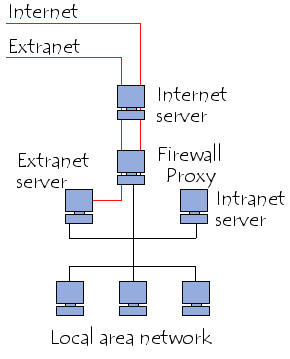
- Intranet = a private network
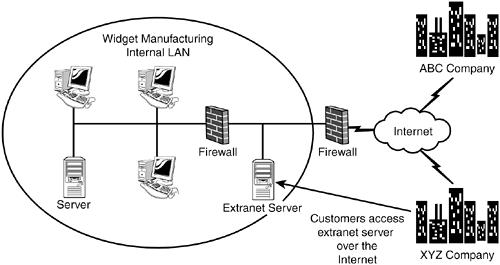
- Extranets = a website or network that allows controlled (=secure) access only to authorized partners, vendors, suppliers, employees, etc.
- Videos
- AnalogX
- Cables - Ethernet
- CNET
- Connecting a LAN to the Internet
- Connecting Private LANs to the Internet (2000/06/22)
- Connection Problems
- Dummies
- Linksys/Cisco routers
- Ports
- port - Webopedia.com
- Port Numbers andServicesDatabase
- http://www.iana.org/assignments/port-numbers
- Webopedia: Well-Known TCP Port Numbers
- Originally, "port" referred to the connectors on the back of the computer: printer port, serial port, joystick port, and so on. Like a seaport, a computer port is somewhere for a device to "dock" or connect to the computer.
Connections made on a network also happen via ports, although in this case there's no physical connector. Internet ports are virtual connections, but the idea is the same. For example, when you access a website you make a connection to the site's Web server over port 80. There's no physical port 80, it's just a way of separating traffic coming in over the network.
UDP stands for User Datagram Protocol, a protocol used by streaming audio and video.
Agreements within the Internet community determine what port a particular service uses. Ports 0 through 1,024 are reserved by IANA, the Internet Assigned Numbers Authority. Other applications claim ports from 1,024 to 65,536. For example, iTunes uses port 3,689 for its music sharing.
- PracticallyNetworked.com
- Routers... (wired networks & WiFi wireless networks, etc.)
- Security (& Virus Info)...
- Sharing Internet access with just one IP address
- Tools - (Networking / DNS / TCP/IP) ...
- Twisted Pair Ethernet (10baseT/UTP) (MSIE only)
- Wi-Fi & Cyber-Cafés
- Internet hot spots could land you in hot water | IT Business
- Working Without Wires: How to Extend Your Wireless Network | PCMag
- Skype - Free Internet telephony that just works
- The Cybercafe Search Engine
- Windows XP Security | Windows Wi-Fi Flaw Lets Others See Your Stuff | January 17, 2006
- When Windows powers up but doesn't find a wireless access point, it creates an ad hoc network, complete with the SSID, the Wi-Fi network identifier, like "linkysys" or "actiontec," of the last network connection
- Recommended that users disable wireless when it's not used, or set Windows' wireless to connect only to access points, not individual notebooks - (click on the wireless icon in the System tray, and open the Wireless Network Connection Properties window. Click on the Wireless Network tab, click on the Advanced button, and click on "Access point (infrastructure) networks only.")
- An even easier way to block the "feature" is to use any firewall, even Windows XP's default firewall
- Windows Networking...
- World of WIndows Networking (site: helmig )
- Everything You Need to Know About Home Networking
-
Windows Networking
- Windows...
- Workgroup
- Workgroup Password | Vista Forums - How to Fix a Password Not Being Accepted When Connecting to a Workgroup Computer
- If you don't want others to access your files, you can prevent other users from accessing your folders and the files they contain. When your computer is connected to a domain, this is called setting permissions for your file or folder. When your computer is connected to a workgroup, this is called making your folders private.
- Homegroup
- See also: Sharing & Permissions ...
- See: Printers ...
- HomeGroup removed from Windows 10 (Version 1803) - Windows Help
- How to Share, Access Files on Multiple PCs Via Homegroup | News & Opinion | PCMag.com
- A Homegroup makes it easy to share pictures, music, documents, videos, and printers with other Windows 7, Windows 8, Windows 8.1, and Windows 10 computers on your local home network. You can also stream media to devices. When a PC creates a homegroup, the homegroup is protected with a password. To join a homegroup, you will need the homegroup password, which you can get from the PC that created the homegroup or any PC already joined to the homegroup.
- Starting with Windows 10 build 17063, the HomeGroup service is no longer operational in Windows 10. The user profile used for sharing and the file/folder/printer shares will continue to work.
Easier Connection: No more remembering cryptic HomeGroup passwords in order to connect to another PC. You can now simply connect through your Microsoft Account email address across devices.
- View or Print Homegroup Password in Windows 10 | Windows 10 Tutorials
- To rename the Homegroup, go to CONTROL PANEL > SYSTEM > Advanced system settings > COMPUTER NAME > Change. All the PCs on your network that have this name will be able to see each other.
However, I find that Windows has this annoying habit of trying to change the workgroup's name back to its Windows default (Workgroup or MSHome) every time there is a Windows Update.
- What is the difference: a domain, a workgroup, a homegroup?
- Sharing
- For those who prefer not to use the Cloud (OneDrive) to connect their devices, the Share functionality for folders and printers allows you to see the available devices and connect them to and from other PCs on your home network.
- Network discovery -|- If you open File Explorer, go to Network, and see an error message ("Network discovery is turned off…."), you'll need to turn on Network discovery to see devices on the network that are sharing files. To turn it on, select the Network discovery is turned off banner, then select Turn on network discovery and file sharing.
- \\localhost -|- How do I tell which files or folders I've shared over a network? Open File Explorer (= Windows Explorer, not Internet Explorer), then type \\localhost into the address bar. Note: When you've shared a file from a folder in your user profile and you go to \\localhost, you'll see your user profile and all its files there. This doesn't mean that all of your files are shared—just that you have access to all your own files.
- View a list of all shared folders on Windows
- Start menu > Computer Management > Computer Management (Local) > System Tools > Shared Folders > Shared
- How to Share, Access Files on Multiple PCs Via Homegroup | News & Opinion | PCMag.com
- Windows XP
- Networking is built in to Windows 98. Just install the internet connection sharing feature through add/remove software/windows setup. Internet Connection Sharing comes free in Windows 98. You can hookup a hub to a second NIC in your sharing system and plug in as many PC's as you can afford.
- Security:
- Hide shares from browsing by adding $ to the end of the share name.
- Remove the Everyone group from sharing and from NTFS permissions.
- Hide your server in order to prevent users from accessing the server through the browse list.
NET CONFIG SERVER /HIDDEN:YES
UNC path can still access the server.
IP address can still access the server.
- "you don't have permission to access the share" - Microsoft Community
- Printing ...
- A network cable is unplugged (annoying recurring popup message)
or
Local Network Disconnected
- http://www.computerhope.com/forum/index.php?topic=59472.0
- Trouble-shooting
- router
- IP conflict
- settings (reset to default?)
- recycle both the modem and the router
- Update the firmware on the router
- defective router
- Modem
- Card (NIC)
- Network cable
- Change the port the cable is using on the router
- Win7 > Start > Run > ncpa.cpl > R-click LAN > Properties > Networking (tab) > Configure (button) > Advanced (tab) > Speed and Duplex > 100Mbps/Half Duplex
- ISP
- Windows Indexing Service settings
- Taskbar clock
- remove from taskbar
- ren root%\System32\timedate.cpl somethingelse
Hub = broadcasts packets to all ports
Switch = channels everything just to where it needs to go, which reduces collisions and LAN traffic.