
 | Control Panel | Date and Time | Change calendar settings | Date (tab)
 | type "change the date and time format"
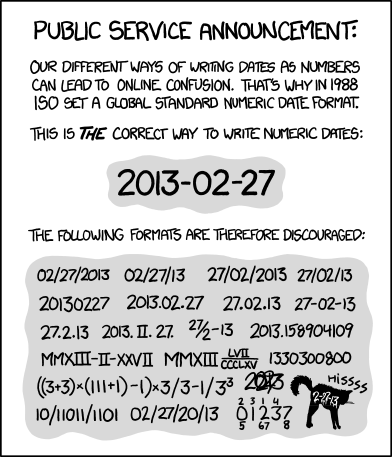
 For example, if you are American and you send a note to your French girlfriend, the love of your life, that you'll meet her under the Eiffel tower on 11/12/10, there is a good chance that you'll never see her again. To you it is obvious that you specified the date as November 12, 2010. In France, as in other French areas, like Quebec, the date is understood to be the December 11, 2010. In your case, it may work out. If you straighten out the misunderstanding in time, you go back a month later and she's still waiting for you. Good luck! To avoid problems, get used to using the ANSI international standard date format: yyyy-mm-dd, as: 2011-12-31. Note the use of the 4-digit year. Remember all that anguish we went through in 1999 with the 2-digit 00 year? We don't want that to happen again. Also, note that the separator is the dash character - , and not the slash /. To set the date format, go through the Windows Control Panel, Regional settings. Since SQL and Access get their formatting from Windows, the format will be selected automatically. |
 Why do Americans write the month before the day? | News | The Guardian -|- PDF (878KB)
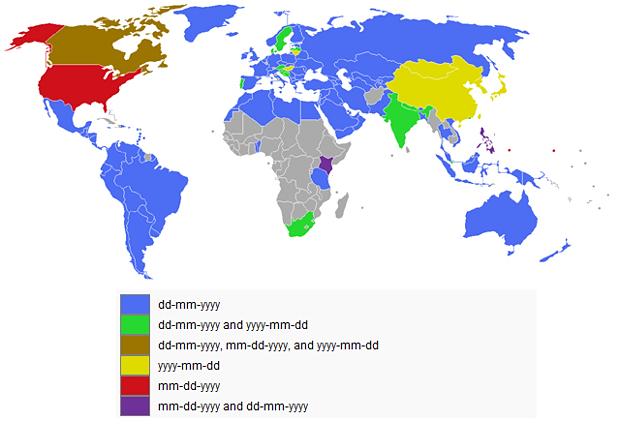
 The Anglophones prefer the American format. (MM/DD/YYYY or MM-DD-YYYY)
The Francophones prefer the French (European) format. (DD/MM/YYYY or DD-MM-YYYY)
The Francophones think that 9/11 (09/11/2001 or 09-11-2001) was the ninth day of November.) (Using the format 2001-09-11 makes this confusion impossible)
When we see a date we never know whether it was written by an Anglophone or a Francophone.
Confusion!!!
The international date format (ISO) is very clear and removes any ambiguity. (YYYY-MM-DD)